

Spirit Mobile – Playing from Your Phone
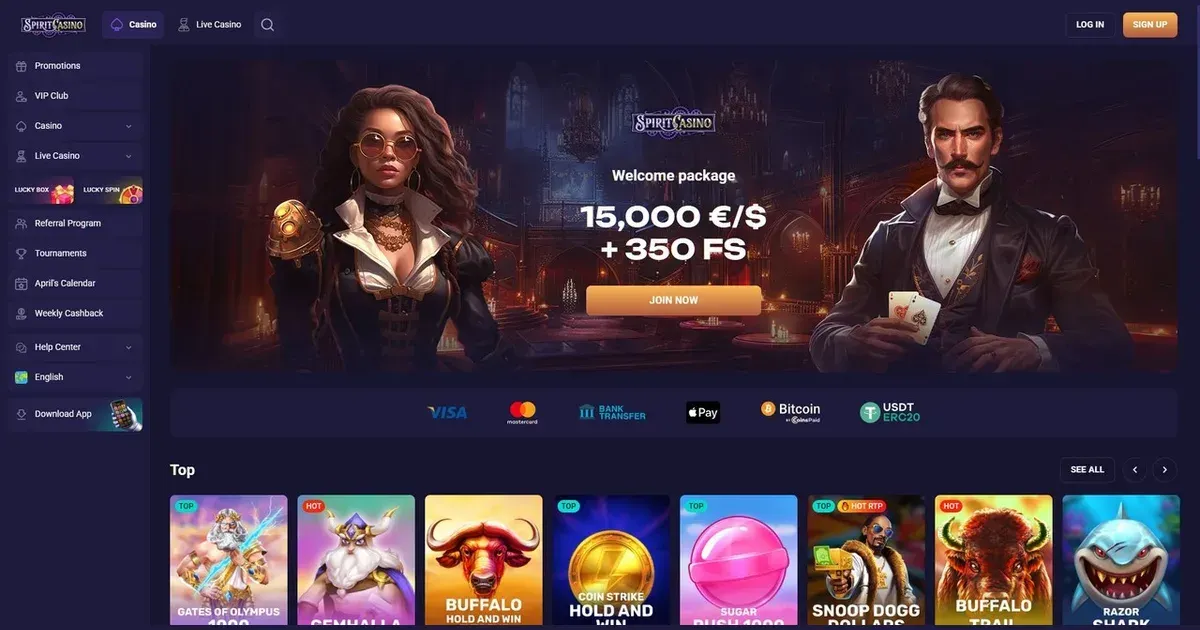
















Spirit runs entirely in mobile browsers – iOS Safari, Android Chrome and the rest. There is no native app to download, no APK, no store listing. You open the site on your phone the same way you would on a laptop, log in with the same credentials, and the platform adapts its layout to the smaller screen. Everything lives at the operator's own domain, accessed through whichever browser your device runs.
The honest answer on apps
Spirit does not publish a dedicated iOS or Android application. The operator's mobile offering is browser-based play – you visit the site in Safari, Chrome or another mobile browser, and the interface scales to fit. No installation, no separate login, no version updates to manage. Your account, balance and history stay identical whether you are on a phone, a tablet or a desktop machine.
The browser route in practice
Open your phone's browser and navigate to the operator's domain. The homepage loads a mobile-optimised layout: larger tap targets, simplified menus, fewer elements per screen. Log in with the same email and password you use everywhere else. Once signed in, you see your balance, the game library filtered by category, and the account menu collapsed into a burger icon at the top. No need to bookmark the login page separately – the site remembers your session for a reasonable time, though you will be asked to sign in again after a few days of inactivity or if you clear your browser's data.
Navigation: Swipe up to scroll through game tiles, tap the menu icon to reach the cashier, support or your account settings. Most sections that exist on the desktop version are present here, though some – like detailed transaction histories or the full bonus terms – require more scrolling because they are stacked vertically rather than spread across a wide screen. The search function sits at the top of the game library; type a title or a provider name and the list narrows instantly.
Features that survive the small screen
The core functions work as expected. You can make a deposit, request a withdrawal, upload verification documents, contact support, claim a bonus, and launch any game the operator offers. The cashier presents the same payment methods as the desktop site – card, e-wallet, crypto – with the same minimum and maximum limits. Withdrawal requests submitted on mobile go into the same queue as those from a laptop, processed within the same 0–24 hour window the operator states.
| Function | Mobile availability |
|---|---|
| Deposits | All methods; same 20 EUR minimum |
| Withdrawals | Same limits (3,000 EUR weekly standard, 5,000 EUR for VIP); 0–24 hour processing |
| KYC uploads | Camera access for photos; file picker for saved documents |
| Support | Contact form; email to [email protected] |
| Game library | Full catalogue; filtered by category, searchable by title |
Slots, live dealer and table games launch in the browser window. Most providers optimise their releases for touch controls: tap to spin, pinch to zoom on paytables, swipe to access game menus. Live dealer feeds scale down without losing clarity on recent-generation phones, though very old devices may struggle with the video bitrate. A stable connection matters more on mobile than on desktop – drop below a certain speed mid-session and the stream buffers or disconnects, losing your place at the table.
Bonus Shop and VIP features: The Redeemable Complimentary Points balance appears in your account menu, and the Bonus Shop page loads the same exchange options – free spins, bonus money, physical items – as it does on a larger screen. VIP members see their tier and perks listed under the account section. Claiming a Monday reload or activating a weekly cashback works identically: enter the code in the cashier's bonus field, meet the deposit threshold, and the bonus credits.
Where mobile is worse than desktop
Small screens mean more scrolling and less information visible at once. The full bonus terms, published at several hundred words, require multiple swipes to read through on a phone. Comparing withdrawal limits across VIP tiers or checking the excluded game list for a promotion takes longer because tables stack vertically and only show a few rows before you scroll again.
Multi-tabling live dealer games is impractical. The desktop site allows you to open several tables in separate browser tabs and switch between them; on mobile, switching tabs reloads the game and breaks your seat. You play one table at a time, full-screen.
Touch accuracy: Buttons in dense menus – the cashier's payment-method grid, the game library's provider filter – sit close together. Tapping the wrong option happens, especially if you are playing one-handed or in motion. The interface does not always confirm your choice before acting, so a misplaced tap can open the wrong game or start the wrong deposit flow. Double-check before you confirm a payment.
Battery drain and data use: Live games and high-definition slots consume more power than static pages. An hour of continuous play can drop your battery by 20–30%, depending on your device and screen brightness. A session over mobile data rather than Wi-Fi uses several hundred megabytes – more if you are streaming live dealer feeds. Set a data limit in your phone's settings if you are on a capped plan, and keep a charger nearby for longer sessions.
A short checklist
Before you place a bet on your phone, confirm these points:
- You are on the operator's real domain. Phishing sites copy the layout; check the address bar matches the URL you know. Bookmark the correct site after your first visit so you never mistype it later.
- Your connection is stable. Public Wi-Fi is convenient but often throttled or insecure. A dropped connection mid-spin usually completes the round and credits any win, but it leaves you guessing until you reconnect. Use mobile data or a private network where possible.
- Sign out when you finish, especially on a shared device. Mobile browsers cache your session; anyone picking up your phone after you can access your balance and request a withdrawal if you stayed logged in. The "remember me" tick is a convenience, not a security feature – use it only on a device you control alone.
- Set deposit and session limits before you start. A phone is always within reach, which makes it easier to deposit impulsively. The operator offers tools to cap your weekly spend and set session time reminders – activate them in the responsible gambling section of your account before your first mobile session, not during one.
- Charge your device. A phone dying mid-game is frustrating; a phone dying mid-withdrawal request is worse. Keep it above 20% or stay near a power source.
Staying in control on a device you always carry
A phone makes gambling frictionless – open the browser, tap a game, play. That convenience is also a risk. Spirit's responsible gambling tools apply across devices: a deposit limit set on desktop holds on mobile, and self-exclusion closes your account everywhere at once. If you find yourself opening the site out of boredom rather than for entertainment, the National Gambling Helpline (0808 8020 133) offers free, confidential support 24/7. BeGambleAware (https://www.begambleaware.org) provides guidance on recognising problem gambling and setting boundaries, and GamStop (https://www.gamstop.co.uk) allows you to self-exclude from all UK-licensed sites at once – though Spirit operates under a Curaçao licence and sits outside that scheme.
Parental controls such as Net Nanny or Qustodio block gambling sites on a shared family device. Set them before handing the phone to a child, not after. You must be 18 or over (18+) to access this site or any online gambling platform. Gambling should be entertainment, not a solution to financial pressure or a daily habit. If it stops feeling like fun, step back – free help is available, and taking a break is not a failure.
This page is for information and marketing purposes only. We are not a casino operator, a bookmaker or an organiser of gambling. Access to this content is restricted to persons aged 18 and over (18+). We encourage you to gamble responsibly – for free, confidential support visit BeGambleAware.org.
Last updated:
Frequently asked questions
Is there a Spirit app to download?
No. Spirit operates as a browser-based platform with no native iOS or Android application. You access the site through Safari, Chrome or another mobile browser using the same account as on desktop.
Can I deposit and withdraw from my phone?
Yes. The mobile cashier offers the same payment methods, limits and processing times as the desktop version. Deposits require a 20 EUR minimum; withdrawals are processed within 0–24 hours depending on the method chosen.
Do all games work on mobile?
The full game library is available, though older devices may struggle with high-definition slots or live dealer streams. A stable connection and a recent-generation phone give the best experience.
What should I check before playing on my phone?
Confirm you are on the operator's real domain, use a stable connection, set deposit limits before you start, and sign out when finished – especially on a shared device. Keep your phone charged for longer sessions.
Game Providers